You can easily connect your Apple Watch to exercise equipment, like a treadmill at Planet Fitness, to record more accurate health data inside the Fitness and Health apps on your iPhone. After all, if you’re working out, you want to make sure your Apple Watch gives you credit for it.
Here’s how.
Connect Apple Watch to Planet Fitness treadmill, stationary bike, elliptical, rowing machine and other gym equipment
The Apple Watch is renowned for how much it packs into a tiny device on your wrist. Depending on the model, it comes with a highly accurate heart rate sensor, blood oxygen sensor, skin temperature sensor and motion sensors. It combines all this to paint the most accurate picture of your activity possible. For example, the Apple Watch tries to infer from its motion data how you’re moving in your exercise, like how much you jump when you run.
But gym equipment you use probably has a lot of data it could contribute, too. It may have a heart rate sensor of its own in the handlebars. And a smart elliptical knows exactly what your motion is like.
You might be able to get the best of both worlds if you pair your Apple Watch with compatible gym equipment. Here’s how.
Table of contents: How to pair Apple Watch with gym equipment
- Turn on ‘Detect Gym Equipment’ in Settings
- Hold your Apple Watch next to the equipment
- Press Start on your gym equipment
- Sync the Planet Fitness Workout app with Apple Health
- More Health & Fitness features
1. Turn on ‘Detect Gym Equipment’ in Settings
Screenshot: D. Griffin Jones/Cult of Mac
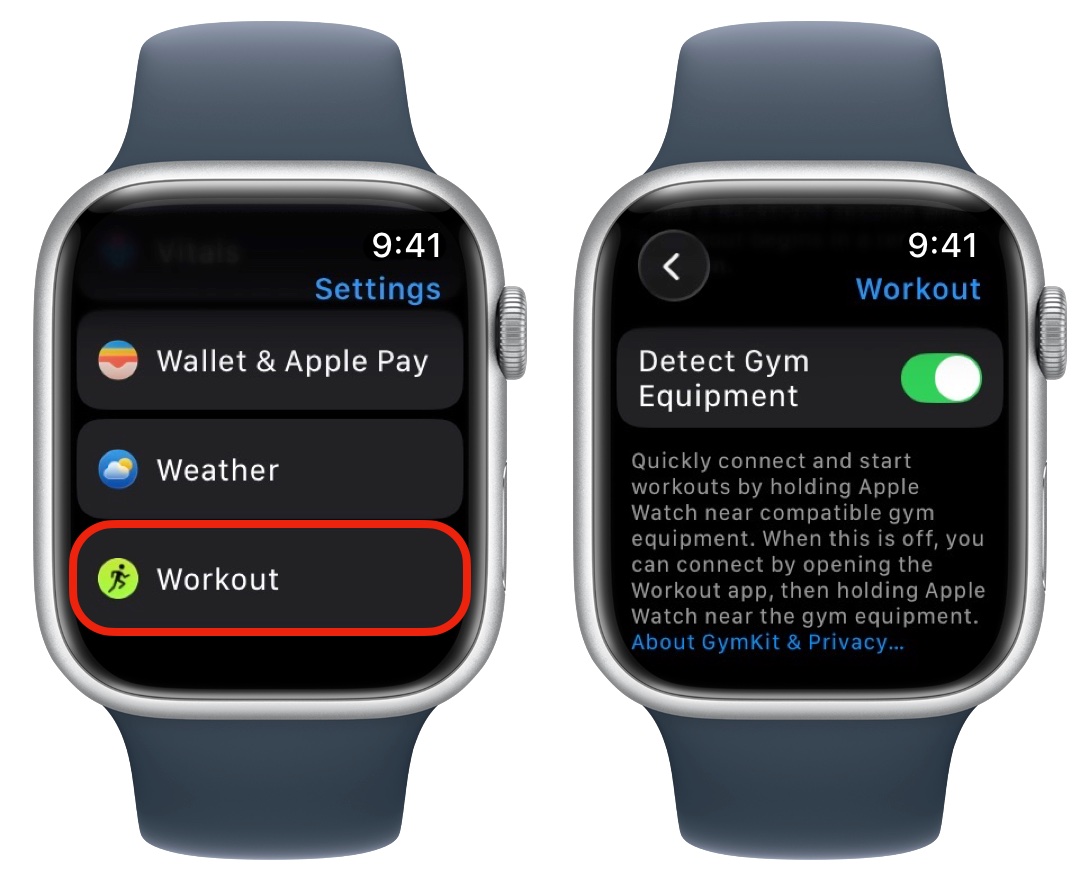
On your Apple Watch, open Settings > Workout (at the very bottom) and turn on Detect Gym Equipment (halfway down the screen). You can find this same setting in the Watch app on your iPhone, too.
2. Hold your Apple Watch next to the treadmill
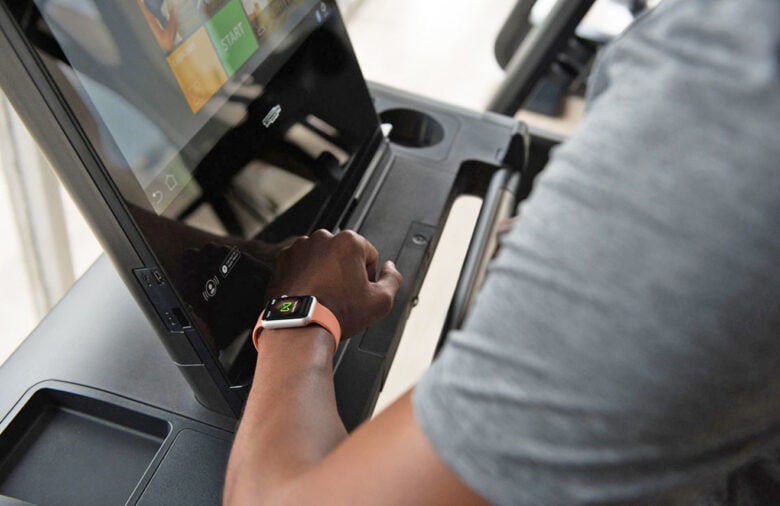
Photo: Apple
These days, you can pair your Apple Watch to a lot of gym exercise machines, including:
- Treadmills
- Stationary bikes
- Ellipticals / cross trainers
- Rowing machines
- StairMasters
All of these exercise machines connect wirelessly to Apple Watch. With the screen facing the gym equipment, hold your Apple Watch next to the contactless reader. It should be marked with an icon or “Connects to Apple Watch.”
If you hear a tap and a beep, the equipment has paired to your watch.
3. Press Start on your gym equipment
Once paired, simply press Start on your gym equipment and your Apple Watch will automatically begin logging a workout. Data will sync to the Fitness app on your iPhone and the Activity app on your Apple Watch. After all, what’s the point of going to the gym if it isn’t helping you close your rings?
4. Sync the Planet Fitness Workout app with Apple Health
Alternatively, you can use the Planet Fitness workout app to track your activity on the chain’s gym equipment. Note: This works even if you don’t wear an Apple Watch.
Download the app to your iPhone, and you’ll be prompted to share data with Apple Health. If you enable this, after your workout, the data will appear in both places automatically.
If you already have the Planet Fitness workout app and this doesn’t work, make sure it’s enabled. Open the Apple Health app, tap on the profile icon in the top right, then tap Privacy > Apps and Services. Tap on an app and make sure its data is shared. (You can delete app data here, too, if you want.)
More health and fitness features
- Track your medications to receive reminders to take your pills, set up a schedule, and even get advice on drug interactions. You can quickly add medications using your iPhone’s camera.
- Track your Apple Watch activity rings to see how much exercise and activity you get in a day. And now, you can pause your streak if you need a break.
- Apple Watch sleep stage tracking shows you how much time you spend overnight in each stage of sleep and gives you a score out of 100.
We originally published this article on how to use an Apple Watch with a treadmill on December 7, 2023. We updated it with the latest information on June 12, 2025, and May 5, 2026.

D. Griffin Jones is a writer, podcaster and video producer for Cult of Mac. Griffin has been a passionate computer enthusiast since 2002, when he got his first PC — but since getting a Mac in 2008, he hasn’t turned back. His skills in graphic and web design, along with video and podcast editing, are self-taught over 20+ years. Griffin has a bachelor’s degree in computer science and has written several (unpublished) apps for Mac and iOS. His collection of old computers is made up of 40+ desktops, laptops, PDAs and devices, dating back to the early ’80s. He brings all of these creative and technical skills, along with a deep knowledge of Apple history, into his work for Cult of Mac.

